Kasa Smart
- 4.7
- Rating
- 5.00M
- Installs
- Free
- Price

 Analysis by App-foxy
I tested Kasa Smart as a practical control center for a TP-LINK smart home, paying particular attention to how comfortably it works for people with different abilities, routines, and levels of technical confidence. It is a free Lifestyle app from TP-LINK SYSTEMS INC., and its basic purpose is easy to understand: bring compatible home devices into one place so you can check, control, and organize them from a phone.
That simple promise matters more than it sounds. A smart-home app can save effort, but only if the controls are easier than walking to a switch, checking a room, or repeating the same task manually. In my experience, Kasa Smart is most convincing when it removes small daily obstacles: turning something off without crossing the room, checking a device from another part of the home, or creating a predictable routine instead of relying on memory.
The app has been available since November 7, 2015, and its current version is 3.4.507. It runs on Android 7.0 or later, carries an Everyone age rating, and has reached over five million installs. Its 4.7 average from around 142 thousand ratings suggests that many users find the overall experience dependable, although a high store score cannot tell you whether it will suit your particular devices, home layout, or accessibility needs.
You May Also Like

 Blood Strike: 2.5 Anniversary
Blood Strike’s Loadouts Turn Every Drop Into a Tactical Gamble
A close look at Blood Strike’s custom loadouts: how fast access to signature weapons reshapes its battle royale rhythm, rewards preparation, and narrows the gap between fights.

 Pandora - Music & Podcasts
Pandora’s Music Is Easy to Start, but Harder to Recover
Pandora’s strength is its low-effort path from a seed to a station. Its weak spot is how much confidence it asks you to place in connection, setup, and quiet recovery.

 8 Ball Pool
 Is Built on Rivalries, Rematches, and Routine
A close look at the rivalries, rematches, shared routines, and unanswered safety questions that turn a quick pool match into a persistent mobile community.

 Samsung Music
’s Quiet Strength Is Playing What You Already Own
Its reach comes less from spectacle than from dependable access to a personal library. That simplicity is both the app’s strongest retention engine and its ceiling.

 AccuWeather: Weather Radar
AccuWeather Review: A Quick, Clear Forecast for Everyday Decisions
For everyday plans, the best forecast is the one you can understand quickly. AccuWeather makes rain timing, radar, and local conditions easy to act on, with a few trade-offs.

 Hill Climb Racing
Why Hill Climb Racing Still Turns Crashes Into One More Run
A tiny car, a bumpy hill and one more upgrade: Hill Climb Racing keeps resurfacing because its simple chaos makes every near-miss feel personal.
More From Our News Desk



How clearly the app presents a smart home
I focus here on how the app makes a connected home easier to understand, because clear organization can matter as much as the controls themselves. I’ll look at how a person can make device labels and room choices more useful to everyone in the household, then consider where that clarity helps—and where it cannot replace a more suitable control option.
Readability and navigation in everyday use
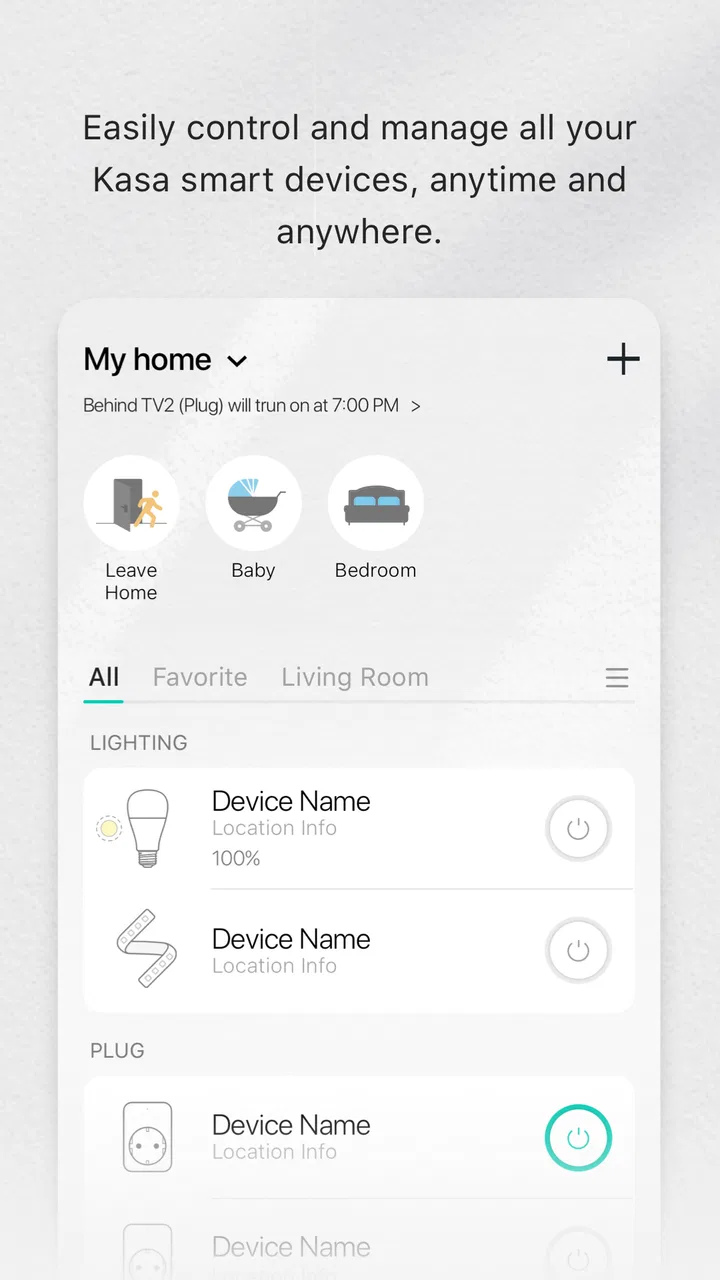
The strongest part of the experience is the basic mental model. You open the app, look for the relevant device, and choose the action you need. That is much easier to learn than a system that hides every control behind several layers of menus. For someone who is new to connected-home equipment, the direct relationship between a device and its control is reassuring.
I also like the idea of organizing a home around rooms and individual devices rather than treating everything as one long technical list. That approach can reduce the amount of searching required when the home contains several plugs, lights, or other TP-LINK products. It is especially useful for a person who remembers location better than product names: “bedroom” or “hallway” is usually more meaningful than a model label.
There is still a learning curve during setup. Smart-home apps ask users to understand a sequence involving the phone, the home network, the device, and the account. Even when the instructions are clear, this is not the same as installing a normal utility app. If a family member needs assistance with the initial configuration, I would set up the devices and naming system with them rather than handing over an unfinished collection of confusing labels.
Good naming becomes an accessibility feature in its own right. I would use names such as “desk lamp” or “front room fan” instead of leaving devices with factory-style names. That small change makes voice instructions, remote control, and troubleshooting less mentally demanding. It also helps when two people share the home but do not use the same terminology for each room.
The interface is most comfortable when I want one clear action. It is less effortless when I am trying to understand several devices at once or decide how a routine should behave. Users who prefer detailed technical dashboards may want more visible status information, while users who are easily overwhelmed may prefer to keep the home small and clearly labeled.
Text, contrast, and the limits of visual confidence
For ordinary reading, the app’s value depends on being able to distinguish device names, states, and controls quickly. I would not assume that every person with low vision will find the presentation equally comfortable. Phone settings such as larger text, magnification, or stronger contrast can help, but the result depends on how the app responds to those system choices on a particular device.
This is an important distinction: an app can be understandable without being equally comfortable for every visual need. Someone with mild difficulty reading small labels may manage well after enlarging the phone’s text. Someone who depends on a screen reader, very large type, or strong non-color cues should test the main device screen and setup flow before committing the whole household to it.
I would also avoid building a naming system that depends on color alone. “Blue lamp” may be quick for one person but unhelpful for someone who cannot distinguish colors reliably. A name based on location and purpose is more robust, and it remains useful when another family member takes over control.
Navigation for people who do not want technical complexity
The app is a reasonable choice for a household where one person enjoys configuring technology and another mainly wants simple control. The setup-minded user can prepare the devices, while the everyday user can focus on turning them on or off and checking their state. That division reduces the pressure on someone who finds network terminology or device pairing difficult.
However, the person responsible for setup becomes an informal support desk. If that person is away, another household member may struggle with changes, replacements, or a lost connection. I recommend writing down plain-language device names and the intended purpose of each one. This is not glamorous, but it makes the system more transferable and prevents a smart home from becoming dependent on one technically confident user.
Motor and sensory considerations
Remote control can be genuinely helpful for people who find repeated reaching, walking, bending, or switching difficult. A user with limited mobility may be able to control a compatible device from a comfortable position instead of navigating the room. Someone recovering from an injury may appreciate the same benefit temporarily, especially for small tasks that otherwise happen many times a day.
There is a practical trade-off. A phone is not automatically easier than a physical switch. It needs to be nearby, charged, unlocked, and usable. A person with tremors or limited fine-motor control may find small on-screen controls frustrating, particularly if a task requires precise tapping. System-level touch assistance, a larger display, or an alternative input method may improve the experience, but I would test the actual sequence rather than assume it will work perfectly.
For users with hearing loss, remote visual status can be more useful than relying on an audible confirmation from a device. Being able to look at the phone and check whether an action appears to have taken effect can reduce uncertainty. At the same time, visual status is only helpful if the user can distinguish the relevant state clearly, so device naming and readable presentation remain important.
For users with sensory sensitivities, connected lighting deserves careful planning. A smart control can make it easier to avoid walking into a bright room and can support a calmer routine, but the app itself does not replace thoughtful choices about the devices being controlled. I would begin with one room and one predictable action rather than automating the entire home at once.
People with cognitive disabilities may benefit from reducing repeated decisions. A clearly named device and a familiar control path can be easier than remembering which physical switch operates which lamp. The risk is that a complicated collection of routines creates a new kind of confusion. I would keep the first setup deliberately small, use consistent names, and avoid adding an automation unless its result is obvious.
Situational access beyond disability
The app is also useful when a person is temporarily limited by circumstances rather than a permanent disability. Imagine carrying groceries, caring for a sleeping child, or staying in bed while recovering from illness. Being able to check or control a compatible home device from the phone can remove a small but real interruption.
A realistic example is an evening routine. I might be in bed and realize that a connected light or appliance in another room needs attention. Instead of getting up, I can open the app, identify the room-based device, and make the change from where I am. The benefit is not dramatic every time, but repeated small conveniences are exactly where a smart-home controller earns its place.
It can also help a person who is away from home and wants to check a device remotely, provided the relevant product and connection are working as expected. I would treat that as convenience rather than a substitute for safety procedures. A phone display should not be the only safeguard for anything that could create a serious hazard if left running.
Shared homes introduce another consideration: clarity matters more than cleverness. If several people control the same devices, everyone should understand what a label means and what an action will affect. A system that feels obvious to its installer may be ambiguous to a visitor, older relative, or housemate who uses different language or has different technical experience.
Three practical habits that improve the experience
First, I would build the device list around physical locations and daily tasks, not around the order in which products were purchased. This makes the app easier to scan and reduces the chance of controlling the wrong item. It is a small organizational choice, but it has a direct effect on confidence for users who rely on recognition rather than memory.
Second, I would test the system at the exact time and place where it needs to help. A control that works comfortably at a desk may be awkward when the user is in bed, holding a walking aid, or using the phone with one hand. Testing the real situation reveals whether the app is genuinely reducing effort or merely moving the effort onto a smaller screen.
Third, I would create a simple fallback plan. Keep essential physical controls usable, make sure more than one trusted person understands the setup, and avoid placing critical safety decisions entirely inside the app. Smart control is most inclusive when it adds an option rather than removing every other option.
Remaining barriers and trade-offs
The biggest limitation is that the app’s usefulness depends on the wider TP-LINK smart-home setup. It is not a universal controller for every brand or every household device. If your home already uses another ecosystem, switching may mean replacing equipment or accepting that different devices will remain in separate apps. For a mixed-brand home, a broader platform may be more convenient, even if it offers less direct control over TP-LINK products.
There is also a difference between controlling a device and making the whole home accessible. The app can reduce physical effort, but it cannot solve every problem involving reach, lighting design, sound, placement, or emergency access. Someone with significant motor limitations may still need hardware positioned carefully. Someone with visual or cognitive needs may require a different interface, clearer environmental cues, or support from another person.
Connectivity problems are another source of friction. When a smart-home action does not happen, the user has to work out whether the issue is the phone, the home network, the device, or the service connection. That uncertainty can be particularly stressful for someone who depends on the app for independence. I would not make it the only way to operate a device that must be controlled immediately.
Privacy and account responsibility also deserve ordinary, practical attention. A remote-control app connects personal routines with household equipment, so I would use a strong account password, avoid sharing access casually, and think carefully about who should be able to control devices. The app’s convenience is greatest when access is intentional rather than handed to everyone without a plan.
Another trade-off is maintenance. A physical switch usually has one job and one obvious state. A smart system adds updates, network dependencies, account recovery, and occasional troubleshooting. For a technology-friendly household, that may be a fair exchange. For someone seeking the simplest possible control, a reliable physical solution may remain better.
Who should choose it, and who should look elsewhere?
I would recommend Kasa Smart to people who already use compatible TP-LINK products or are building a small smart home around them. It is particularly appealing when remote control can reduce walking, reaching, or repeated manual tasks. Families may also appreciate having a shared, room-oriented way to manage devices, as long as the setup is kept understandable.
I would be more cautious if accessibility depends on a specific screen-reader behavior, unusually large text, specialized input, or guaranteed operation during network problems. In those cases, test the exact phone, operating-system settings, and device combination first. A platform with stronger support for your preferred accessibility tools may be a better choice than selecting an app only because its general interface looks simple.
I would also skip it as a first choice if your home contains many brands and you want one unified system. A broader smart-home platform may reduce app switching, while a physical control may be preferable for a single light or appliance that does not need remote access. The right question is not whether smart control is impressive; it is whether this particular control removes more effort than it introduces.
My inclusive verdict
After using it as a home-control tool, I see Kasa Smart as a practical option with meaningful accessibility benefits, but not as a complete accessibility solution. Its best quality is the way it can turn distant or repetitive actions into a phone-based task. Clear naming, a modest device setup, and a fallback plan make a noticeable difference.
The app is free, rated for Everyone, and has a 4.7 average across around 142 thousand ratings, which gives it a strong public track record. Still, those figures should not replace a personal test. Accessibility is shaped by the phone, the connected products, the network, and the user’s own way of interacting with technology.
My recommendation is to start with one compatible device in the room where it can remove the most effort. Give it a plain name, try it under real conditions, and check whether the controls remain comfortable when you are tired, distracted, or using the phone differently. If that trial makes daily life easier without creating new uncertainty, expanding the setup makes sense. For the right TP-LINK household, Kasa Smart is a useful layer of independence; for a mixed or highly specialized setup, a different control system may be the more inclusive choice.
FAQs for Kasa Smart
01What devices are compatible with the Kasa Smart app?
The Kasa Smart app is compatible with Android and iOS devices. To ensure optimal performance, the app requires Android 5.0 or later and iOS 10.0 or later. It's advisable to keep your device updated to the latest OS version for the best experience and access to new features.
02How secure is the Kasa Smart app?
Security is a top priority for the Kasa Smart app. It uses advanced encryption protocols to protect your data and secure your smart home environment. Regular updates are provided to address any vulnerabilities. Users are encouraged to enable two-factor authentication for added security.
03Can I control Kasa Smart devices remotely?
Yes, you can control Kasa Smart devices from anywhere using the app. As long as your phone has an internet connection, you can manage your devices and check their status remotely, whether you're at home or on the go, providing convenience and peace of mind.
04Does the Kasa Smart app support voice control?
The Kasa Smart app is compatible with popular voice assistants like Amazon Alexa and Google Assistant. This allows you to control your devices using voice commands, making it easy to integrate into your existing smart home ecosystem and enhance your hands-free experience.
05Is there a subscription fee for using the Kasa Smart app?
The Kasa Smart app itself does not require a subscription fee. However, certain advanced features or integrations might involve additional costs, depending on the devices or services you wish to connect with. It's best to check specific device requirements and terms for any potential charges.
Pros
- User-friendly interface for quick setup.
- Wide range of compatible smart devices.
- Remote control from anywhere via app.
- Integration with Alexa and Google Assistant.
- Scheduling feature for automating tasks.
Cons
- Limited compatibility with third-party devices.
- Occasional connectivity issues reported.
- No support for Apple HomeKit.
- Requires stable internet connection.
- Some features require paid subscription.

Kasa Smart
Gallery